.png)


Supercharge Your WooCommerce Store with Marketing Automation

TL;DR:
- Automation drives up to 30% of eCommerce revenue by improving retention and repeat purchases.
- Core workflows include abandoned cart recovery, post-purchase sequences, win-back campaigns, and product recommendations.
- Selecting the right tools like AutomateWoo, Klaviyo, or Omnisend depends on your technical needs and data strategy.
Automated emails drive up to 30% of eCommerce revenue, yet most DTC brands running WooCommerce still rely on manual follow-ups, batch-and-blast campaigns, and gut-feel timing. If you manage marketing for a high-growth store, that gap is costing you repeat purchases every single day. Automation is not a luxury reserved for enterprise retailers with seven-figure tech budgets. It is a growth lever any WooCommerce brand can pull with the right workflows, tools, and strategy. This guide walks you through the exact automations that move the needle, the platforms worth your attention, and the implementation traps that quietly kill retention programs before they ever get off the ground.
Table of Contents
- Why marketing automation is essential for WooCommerce growth
- Core WooCommerce automation workflows that drive retention
- Top WooCommerce automation tools: native plugins vs. SaaS platforms
- Implementation tips, edge cases, and avoiding common automation pitfalls
- The uncomfortable truth about WooCommerce marketing automation
- Get expert help to scale your WooCommerce retention
- Frequently asked questions
Key Takeaways
| Point | Details |
|---|---|
| Retention is key | Automated retention campaigns drive more revenue at a lower cost than chasing new customers. |
| Use proven workflows | Abandoned cart, post-purchase, and win-back automations yield fast wins and higher LTV. |
| Choose the right platform | Native and SaaS tools each have strengths—pick what fits your data, growth stage, and segmentation needs. |
| Test and prioritize | Validate automations in staging, monitor deliverability, and avoid fatigue by targeting the most impactful flows. |
Why marketing automation is essential for WooCommerce growth
Retention is the engine of DTC profitability. Acquiring new customers costs 5 to 7 times more than keeping an existing one, which means every repeat purchase you earn is margin you did not have to buy with ad spend. Lifetime value (LTV) is the metric that separates scaling brands from stagnant ones, and automation is the most reliable way to grow it systematically.
Let’s define the terms. Marketing automation means using software to trigger personalized messages based on customer behavior, purchase history, or time delays without manual work for each send. Customer retention is the practice of keeping buyers coming back after their first order. LTV, or lifetime value, is the total revenue a customer generates over their entire relationship with your brand.
The contrast between manual and automated retention is stark. A manual approach means your team remembers to send a follow-up email after a purchase, maybe three days later, maybe a week, maybe never if they are swamped. An automated workflow fires the moment the order is confirmed, sequences a review request on day five, and drops a replenishment reminder on day thirty. Speed, consistency, and personalization happen at scale, with zero marginal labor cost per send.
The revenue math is compelling:
- Automated emails generate up to 30% of total eCommerce revenue for brands that set them up correctly
- Retention-focused strategies routinely contribute 20 to 40% of store revenue
- A 5% increase in retention can increase profits by 25 to 95%, according to widely cited research in customer economics
- Personalized automation outperforms generic blasts on open rate, click rate, and conversion across every benchmark study
For high-growth DTC brands, automation is not about replacing creativity. It is about making sure your best ideas reach the right person at exactly the right moment, every time. Explore examples of ecommerce email marketing strategies that show what this looks like in practice, and look at how automated email campaigns are structured to maintain that personal feel at scale.
Pro Tip: Start by auditing what revenue your store is currently capturing post-purchase versus what you are leaving on the table. If you have no active flows, you are likely leaving 15 to 30% of recoverable revenue unrealized.
Now that you know the impact, let’s break down the essential automation workflows you need.
Core WooCommerce automation workflows that drive retention
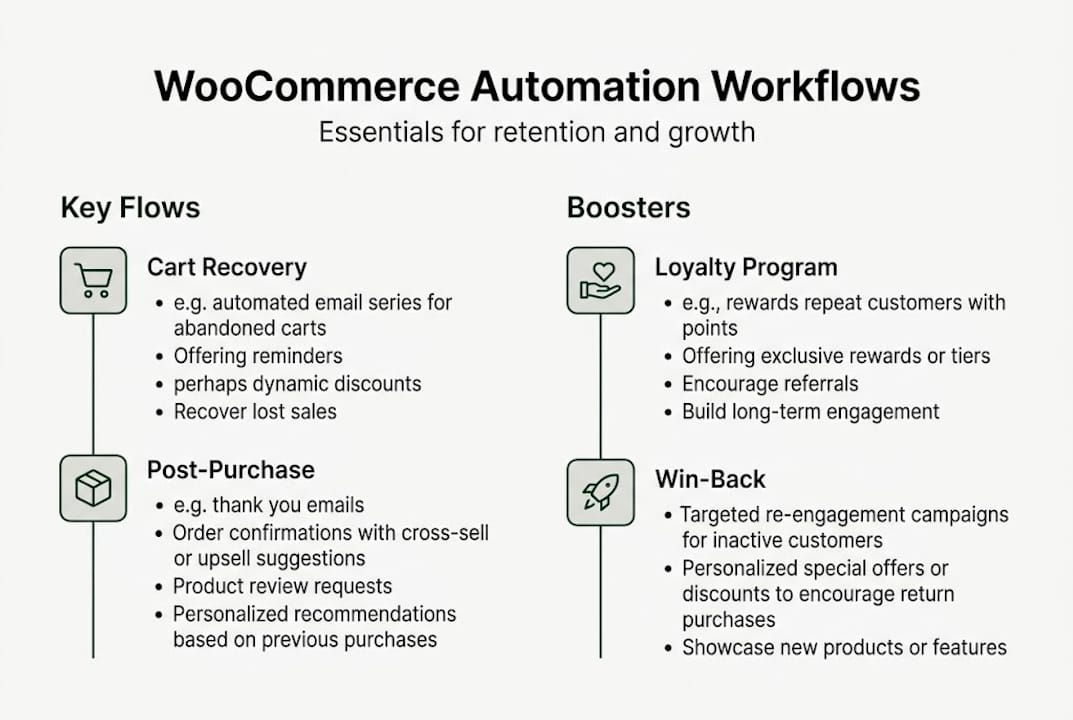
Not all automations are created equal. Some recover revenue you already earned but almost lost. Others build the loyalty that turns a one-time buyer into a brand advocate. Here is a breakdown of the four tier-one workflows every WooCommerce store should activate first.
- Abandoned cart recovery. A shopper adds to cart, gets distracted, and leaves. A well-timed three-email sequence (30 minutes, 24 hours, 72 hours) can recover 15 to 30% of those carts. That is pure recovered revenue from customers who already signaled intent.
- Post-purchase sequence. This flow confirms the order, sets expectations on shipping, requests a review, and introduces complementary products. Brands using structured post-purchase flows see a 20 to 30% lift in repeat purchase rates within 90 days.
- Win-back campaign. Customers who have not purchased in 90 to 180 days get a targeted reactivation sequence. Expect an 8 to 12% reactivation rate when messaging is personalized to their last purchase category.
- Product recommendations. Behavioral triggers fire when a customer views a product but does not buy, or when their purchase history suggests a logical next product. This keeps your store top-of-mind without feeling intrusive.
| Workflow | Average recovery or lift | Priority tier |
|---|---|---|
| Abandoned cart | 15 to 30% cart recovery | Tier 1 |
| Post-purchase sequence | 20 to 30% repeat lift | Tier 1 |
| Win-back campaign | 8 to 12% reactivation | Tier 1 |
| Product recommendations | Varies by catalog depth | Tier 2 |
| Loyalty and points | 20 to 30% frequency lift | Tier 2 |
Loyalty and points automation deserves special mention. Programs that reward repeat purchases and referrals can lift purchase frequency by 20 to 30%, and the automation layer makes them hands-free once configured. Points balance reminders and tier-upgrade notifications are particularly effective for driving incremental orders.
For detailed setup guidance on sequencing these flows, check out setting up automated email campaigns and pick up additional email automation tips tailored for e-commerce brands.
Pro Tip: Activate tier-1 flows before building anything else. Cart recovery and post-purchase alone generate the fastest measurable ROI, typically within the first 30 days of going live.
With these high-impact flows mapped out, your next decision is which tools best fit your strategy and scale.
Top WooCommerce automation tools: native plugins vs. SaaS platforms
Three platforms dominate WooCommerce marketing automation right now: AutomateWoo, Klaviyo, and Omnisend. Each has a distinct positioning, and the right choice depends on your team’s technical depth, your data strategy, and how fast you need to move.
AutomateWoo is a native WooCommerce plugin, rule-based, used by 40,000-plus stores. Because it lives inside your WordPress environment, triggers fire instantly from real-time store events. You own your data entirely, which matters for GDPR compliance and for brands wary of third-party data exposure. The trade-off is that advanced segmentation and predictive analytics require more manual configuration.

Klaviyo is a SaaS platform with best-in-class predictive analytics, AI-driven segmentation, and real-time personalization. Brands using Klaviyo’s automation architecture have seen 47% automation revenue growth after fully implementing their flows. The WooCommerce integration is solid, though data syncs offsite, which is worth flagging for your privacy team.
Omnisend is the fastest platform to get live. Its multichannel workflows, combining email, SMS, and push in one canvas, sync cleanly with WooCommerce and deliver strong cart recovery performance without requiring deep technical configuration. It is the best choice for brands that need results in days, not weeks.
| Platform | Best for | Data ownership | Complexity |
|---|---|---|---|
| AutomateWoo | WooCommerce-native control | Full (on-site) | Medium |
| Klaviyo | AI segmentation and scale | Shared (SaaS) | High |
| Omnisend | Fast multichannel launch | Shared (SaaS) | Low |
For brands selling across multiple regions, multilingual conversion support can meaningfully boost the effectiveness of your automation by making sure localized messages convert at the same rate as English-language flows.
When it comes to creative execution, pair your platform selection with a strong email marketing strategy guide and complement it with email design best practices so your flows look as good as they perform.
Once you’ve selected your platform, implementation details and edge cases will determine your ultimate success.
Implementation tips, edge cases, and avoiding common automation pitfalls
Setting up flows is only half the work. The brands that actually see sustained retention gains are the ones that build a QA process around their automations from day one.
- Test every flow in staging first. Broken triggers and malformed dynamic tags are invisible until they hit a real customer’s inbox. Always run end-to-end tests in a staging environment before pushing live.
- Manage your unengaged list aggressively. Sending to subscribers who have not opened in six months tanks deliverability. Suppress them, run a dedicated re-engagement flow, then remove those who do not respond.
- Throttle your send volume during launches. If you are moving from a cold IP or a new sending domain, ramp volume gradually over two to four weeks to protect sender reputation.
- Use Action Scheduler for high-traffic stores. High-traffic stores must offload automated actions using Action Scheduler queues to prevent server overload during peak traffic events. This is a non-negotiable for stores running Black Friday or flash sale volumes.
- Enforce GDPR compliance from setup. GDPR requires double opt-in and explicit consent before syncing subscriber data to any email platform. Build this into your checkout flow, not as an afterthought.
“Over-automation is a real risk. When every customer action triggers an email, your flows stop feeling personal and start feeling like noise. Fewer, better-timed automations consistently outperform high-volume spray-and-pray sequences.”
For multilingual engagement strategies, the same QA principle applies. Test every language variant of your flows the same way you test your primary language version.
Keep your fundamentals sharp with proven email best practices, revisit your email marketing optimization tips regularly as your list grows, and layer in a personalized email strategy to push beyond generic triggers into genuinely relevant messaging.
Pro Tip: Schedule a quarterly automation audit. Check trigger logic, test dynamic content fields, review send frequency, and confirm consent records are current. Flows that worked perfectly at launch drift over time as your catalog and customer base evolve.
Now let’s pull these lessons together with a big-picture perspective on what actually drives results with WooCommerce automation.
The uncomfortable truth about WooCommerce marketing automation
Here is what most automation guides will not tell you: installing a plugin and activating the default templates is not a retention strategy. It is a starting point. We see it constantly with brands that come to us frustrated after months of automation “running” with flat retention metrics. The flows were live, the triggers were firing, and the results were mediocre. Why? Because generic templates, copied from a tool’s onboarding wizard, do not reflect your brand voice, your customer’s actual buying patterns, or your catalog’s natural upsell logic.
The brands that win with automation do fewer things better. They invest in understanding the customer journey before touching a single workflow builder. They test aggressively, not just open rates but downstream revenue per recipient. And they treat automation as a conversation, not a broadcast.
More flows is not the answer. Smarter flows are. A hybrid stack, native plugin for real-time triggers plus a SaaS layer for segmentation and analytics, often outperforms any single tool used in isolation. Stay current with marketing automation insights and you will see this pattern repeated across the highest-performing DTC brands we work with.
Get expert help to scale your WooCommerce retention
Want the fastest track to automate and grow? The Email Marketers builds retention systems that go far beyond templates. We audit your current WooCommerce setup, identify the highest-value automation gaps, and build flows that reflect your brand and your customers’ behavior. Our Retention Toolkit gives you a head start with proven frameworks, and our case study results show exactly what is possible when strategy meets execution. If you are ready to build a retention engine that compounds month over month, our Retention Lab is designed for brands that are serious about growing LTV and not just filling inboxes.
Frequently asked questions
Which WooCommerce automation is best for abandoned carts?
AutomateWoo, Klaviyo, and Omnisend each offer best-in-class abandoned cart automations for WooCommerce, with recovery rates ranging from 15 to 30% depending on sequence timing and personalization depth.
How do I maximize repeat purchases with WooCommerce automation?
Set up post-purchase and win-back workflows immediately, then layer in loyalty program automations to lift repeat purchase frequency and grow customer lifetime value over time.
What’s the difference between native automation plugins and SaaS platforms?
Native plugins like AutomateWoo give you real-time triggers and full data ownership within WordPress, while SaaS platforms like Klaviyo offer AI-driven segmentation and predictive analytics but sync data offsite.
How do I keep my automations GDPR-compliant on WooCommerce?
Always implement double opt-in processes and display explicit consent checkboxes at checkout before syncing any subscriber data to your email or SMS platform.
Recommended
- Automated Email Campaigns: Everything You Need to Know
- Email Automation: A Deep Dive Into One Of The Must-Have Email Marketing Tools
- 7 Proven Email Automation Tips for Ecom Brands Success
- Email Marketing Optimization Guide 2025 for Ecom Brands
- Maximizing Efficiency: How Workflow Automation Transforms Businesses - Toptest Global | QA-Driven IT & Workflow Automation Solutions


