.png)


What Are Automated Emails? A Marketer's 2026 Guide

TL;DR:
- Automated emails are triggered messages sent without manual effort based on customer actions or conditions, increasing revenue and engagement. Proper setup, regular auditing, and personalized content are essential to avoid perceived coldness and maximize effectiveness. Focusing on key sequences like welcome, cart abandonment, and re-engagement enhances retention and overall campaign success.
Automated emails are pre-built messages sent to specific people when a defined condition is met, no manual send required. While many marketers assume automation means generic, impersonal blasts, the reality is the opposite. Businesses using automated campaigns generate 320% more revenue than those relying on manual efforts, with open rates hitting 42% compared to the 15-25% typical of hand-sent campaigns. This guide breaks down what automated emails are, how they work technically, what the best examples look like in practice, and how to build sequences that drive real retention and revenue for your brand.
Table of Contents
- Key takeaways
- What automated emails are and how they work
- Benefits of automated emails compared to manual campaigns
- Examples of automated email types you should be using
- Best practices for creating automated email campaigns
- My honest take on automated emails after years in retention
- Ready to build automated flows that actually retain customers?
- FAQ
Key takeaways
| Point | Details |
|---|---|
| Automation beats manual sends | Automated campaigns produce 320% more revenue and achieve significantly higher open rates than manual emails. |
| Triggers drive relevance | Behavior-based triggers (clicks, purchases, sign-ups) make emails feel timely and personal rather than scheduled and generic. |
| Workflows need regular auditing | Reviewing sequences every 3 to 6 months prevents audience fatigue and keeps engagement metrics healthy. |
| Balance automation with empathy | Purely automated chains frustrate customers. Human follow-up in complex situations is not optional, it’s expected. |
| Infrastructure determines deliverability | SPF, DKIM, and DMARC records must be configured correctly before you send a single automated message at scale. |
What automated emails are and how they work
Automated emails are messages triggered and delivered by software based on rules you set in advance. You define the condition. The platform monitors for it. When a subscriber or customer matches that condition, the email fires. You are not involved in the moment of sending.
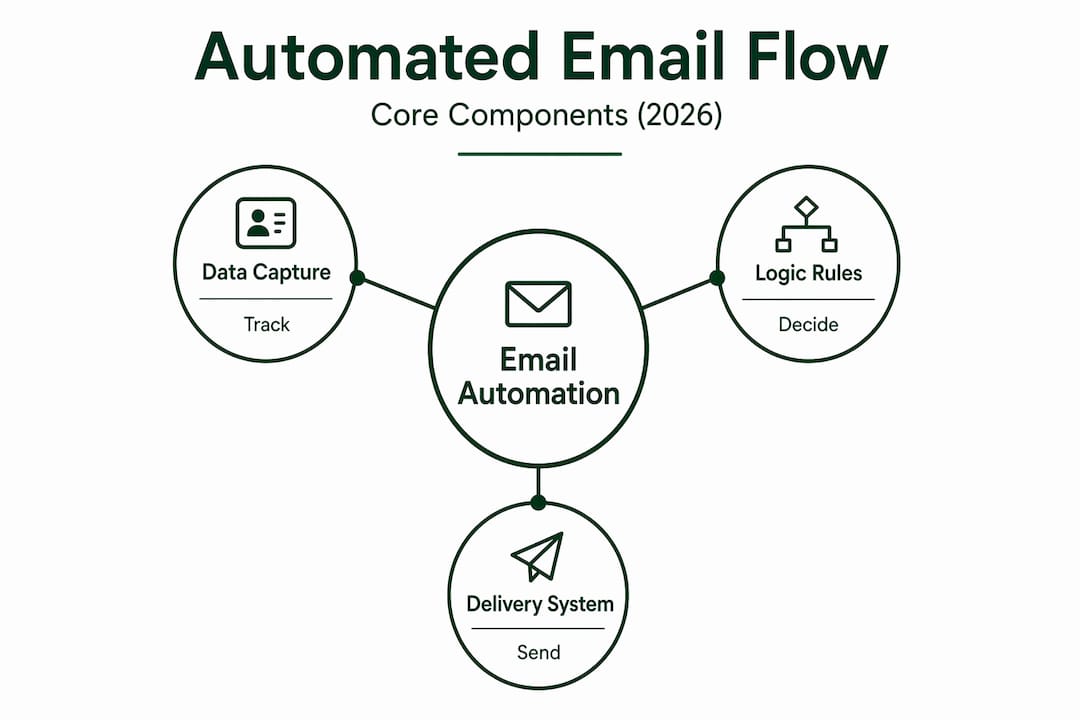
The three core components that make this possible are data capture, logic rules, and a delivery system. Data capture pulls information from your website, CRM, or e-commerce platform. That might be a form submission, a product page visit, a purchase completion, or a cart abandonment event. The logic layer evaluates that data against your rules and decides which message to send, when to send it, and to whom. The delivery system then executes the send at the defined time.
Behavior-driven vs. schedule-driven sends
Not all automated emails work the same way. Schedule-driven sends go out at a fixed time regardless of what the recipient has done. Think of a weekly newsletter or a monthly digest. Behavior-driven sends, by contrast, fire when a specific action happens. A customer adds items to their cart and leaves. Your abandoned cart email fires one hour later. That email arrives because of what that person did, not because Tuesday at 10 a.m. rolled around.
Behavior-based triggers outperform calendar-based sends for relevance because the timing is contextual. You are responding to the customer’s signal, which makes the message feel less like marketing and more like service.
Where AI fits into the picture
Modern automation platforms use branching logic and AI to adapt content based on what the user does after the first message. If a subscriber opens your welcome email and clicks on Product Category A, the next email in the sequence can automatically feature related products from that category. If they ignore the first email entirely, a different branch sends a follow-up with a different subject line or offer. This is not magic. It is if-then logic applied at scale, and it is what separates a real retention system from a simple drip sequence.

Pro Tip: Start by mapping your three most common customer actions: sign-up, purchase, and inactivity. Build one automated sequence for each before expanding. Complexity should follow results, not the other way around.
Benefits of automated emails compared to manual campaigns
The case for automation is not theoretical. Companies implementing email automation save up to 80% of the time spent on manual campaign management, reduce production time by 40%, and cut manual data entry errors by 68%. For a marketing team managing thousands of contacts, those numbers represent real hours returned to strategy and creative work.
Here is how the concrete benefits stack up across the dimensions that matter most to marketing professionals:
| Benefit | Manual campaigns | Automated campaigns |
|---|---|---|
| Revenue per campaign | Baseline | Up to 320% higher |
| Average open rate | 15–25% | Up to 42% |
| Time spent on management | High (ongoing manual effort) | Reduced by up to 80% |
| Data entry error rate | Standard | Reduced by 68% |
| Message timing accuracy | Depends on team availability | Triggered to the minute |
The engagement lift comes directly from relevance. 78% of customers expect prompt follow-ups after interacting with a brand. No human team can scale that expectation across thousands of customers simultaneously. Automation can.
There is one concern worth addressing directly: the fear that automation makes communication feel cold. This is a real risk, but it is a design problem, not an automation problem. When your triggers are connected to genuine customer behaviors and your copy is written with a specific segment in mind, the email does not feel automated at all. It feels like good timing.
Pro Tip: Add one personalization token beyond just the first name. Reference the specific product a customer browsed, the category they purchased from, or the date of their last order. Single-field personalization alone is not enough to feel human in 2026.
Examples of automated email types you should be using
Understanding the mechanics is one thing. Seeing how automated emails play out across a real customer lifecycle makes it concrete. Here are the most impactful types, in order of where they appear in the customer journey:
-
Welcome and onboarding series. Triggered immediately when someone subscribes or creates an account. The first email confirms the action and sets expectations. Emails two and three introduce your brand story, bestsellers, or a new customer offer. Spread across three to five days, this sequence does more for lifetime value than most brands realize.
-
Abandoned cart reminders. A three-part sequence is the standard. Email one fires one hour after abandonment and reminds the customer what they left behind. Email two arrives 24 hours later and might address common objections (sizing, returns, shipping). Email three, sent 48 to 72 hours out, often includes a time-limited incentive. Together, this sequence recovers revenue that would otherwise disappear permanently.
-
Post-purchase and loyalty milestone emails. After a purchase, the sequence might include an order confirmation, a shipping update, a delivery confirmation, and then a review request at day seven. At purchase three, a loyalty milestone email with an exclusive reward fires automatically. These emails have high open rates because customers are actively looking for them.
-
Re-engagement and win-back campaigns. When a subscriber has not opened an email in 90 days, a win-back sequence fires. The first email acknowledges the silence and asks if the customer still wants to hear from you. The second offers a reason to return. The third asks for explicit confirmation to stay on the list. Subscribers who do not re-engage get removed, which protects your sender reputation and keeps your list healthy.
-
Behavior-based educational sequences. A customer buys a product that requires some setup or education. An automated sequence triggers over the following two weeks, sending tips, tutorials, or use-case ideas timed to when people typically get stuck. This reduces support tickets and increases repeat purchase rates simultaneously.
The differences between these types matter. Transactional emails (confirmations, shipping updates) are expected and functional. Marketing automation emails are designed to move a customer toward a desired behavior. Sales outreach emails, used more in B2B, are triggered by lead scoring or CRM activity. Mixing these up leads to tone mismatches that erode trust fast.
Best practices for creating automated email campaigns
Getting automation right requires attention to several layers that most guides skip past. Here is where campaigns actually fail, and how to prevent it.
-
Set up your sender infrastructure before anything else. SPF, DKIM, and DMARC records are not optional. Without them, your automated emails will land in spam regardless of how good the content is. New domains also need a warm-up period with gradually increasing send volumes to build sender reputation before scaling.
-
Monitor performance metrics weekly, not monthly. Open rates, click rates, and bounce rates tell you early when a sequence is degrading. Catching a problem at week two is far less damaging than discovering it at month three when your domain reputation has taken a hit.
-
Avoid automation fatigue by spacing your sequences. When a customer is enrolled in a welcome series, an abandoned cart sequence, and a post-purchase flow simultaneously, they can receive five emails in a single day. Most platforms allow you to set frequency caps across automation triggers. Use them.
-
Audit your sequences every three to six months. Offers expire, products sell out, and pricing changes. An email with a discount code from 18 months ago that no longer applies damages credibility. Set a calendar reminder and treat auditing as part of your standard workflow.
-
Integrate human follow-up in high-stakes situations. Automated emails should never replace empathy in complex problem resolution. An automated acknowledgment after a complaint is appropriate. Letting the resolution itself be fully automated is not.
-
Segment before you build. An automation that fires for every subscriber regardless of purchase history, location, or engagement level is better than nothing but not by much. Even basic segmentation (new vs. returning, buyers vs. non-buyers) dramatically improves relevance.
Pro Tip: When you audit a sequence, look specifically at the drop-off between email one and email two. If a large portion of recipients open the first email but not the second, the problem is usually either the gap in timing or a mismatch between what email one promised and what email two delivered.
My honest take on automated emails after years in retention
I have built and audited hundreds of automated email flows for e-commerce brands. And the single biggest mistake I see is brands treating automation as a destination rather than a foundation.
The thinking goes: set up the flows, let them run, move on. But workflows require ongoing optimization based on data and customer feedback. What worked when your brand had 10,000 subscribers often breaks when you hit 100,000, because your audience is more diverse, their expectations are higher, and the sequences you built for one customer persona are now reaching five.
What I have found actually works is starting with two or three flows that cover the highest-impact moments, welcome, cart abandonment, and post-purchase, and then monitoring them aggressively for the first 90 days. The data from those three sequences tells you more about your customers than most brands learn in a year of manual sending. Then you build from there.
I have also seen 70% of customers express frustration with purely automated communication chains. That number is not surprising to me. It is the natural result of automation that responds to every behavior with a predetermined script, regardless of context. The fix is not less automation. It is smarter automation paired with human checkpoints at the moments that actually matter.
Automation should be the backbone, not the entirety, of how you communicate. The brands I have seen win long term are the ones that let automation handle the predictable and let people handle the irreplaceable.
— Melanie
Ready to build automated flows that actually retain customers?
At Theemailmarketers, we specialize in designing and managing automated email campaigns for e-commerce brands that want more than a set-it-and-forget-it approach. Our team builds behavior-triggered sequences, full lifecycle workflows, and AI-personalized campaigns tailored to your specific customer base and revenue goals. We handle the infrastructure, the strategy, the copy, and the ongoing optimization. If you want to see what results-driven retention marketing looks like in practice, browse our client case studies or explore the retention toolkit we use with high-growth DTC brands.
FAQ
What are automated emails in simple terms?
Automated emails are messages sent automatically by software when a specific condition is met, such as a new sign-up, a purchase, or a cart abandonment. No manual send is required after the initial setup.
How do automated emails work technically?
Your automation platform captures data from your website or CRM, applies your defined logic rules, and delivers the right message to the right person at the right time. Branching logic can further personalize the sequence based on how each recipient behaves after the first message.
Why use automated emails instead of manual sends?
Automated emails produce significantly better results. Automated campaigns generate 320% more revenue and achieve open rates of 42%, compared to 15-25% for manually sent emails. They also free up substantial team time for higher-level strategy.
What are the most effective examples of automated emails?
Welcome sequences, abandoned cart reminders, post-purchase flows, and re-engagement campaigns are the four highest-impact types. Each addresses a distinct moment in the customer lifecycle and fires based on specific customer behavior.
How often should you audit automated email campaigns?
Auditing every three to six months is the standard recommendation. Regular audits catch expired offers, deliverability issues, and sequence fatigue before they damage your sender reputation or reduce list engagement.


