.png)


Email Marketing Integration for E-Commerce Growth in 2026

TL;DR:
- Most e-commerce teams treat email integration as a simple technical task, but true integration enables real-time, personalized customer journeys. It requires seamless data sync across systems, consistent identity resolution, and ongoing maintenance to prevent trust erosion and maximize ROI. Fully integrated systems drive automated flows, improve deliverability, and enhance AI capabilities, ultimately boosting retention and revenue.
Most e-commerce marketers treat email marketing integration as a one-time technical task. Connect your store, flip a switch, and you’re done. That framing costs you real revenue. True email marketing integration is the foundation of personalized, automated customer journeys that run on real-time data across your entire tech stack. Get it right, and you stop guessing about what your customers want. You actually know, and your emails reflect that. This article breaks down what genuine integration looks like, which systems matter most, and how to build a setup that drives retention and ROI at scale.
Table of Contents
- Key takeaways
- What email marketing integration actually means
- Key systems to integrate with your email platform
- Automation and AI in integrated email marketing
- Deliverability and compliance in integrated systems
- Practical steps to integrate your email marketing
- My take on what integration really demands
- How The Email Marketers builds integration that drives retention
- FAQ
Key takeaways
| Point | Details |
|---|---|
| Integration goes beyond plug-ins | Real email marketing integration unifies live customer data across CRM, store, and support tools, not just software connections. |
| Automation drives most revenue | Eight core automated flows generate roughly 80% of email revenue; welcome, cart, and post-purchase flows alone cover 70%. |
| AI needs clean data first | Teams with fully integrated AI are 75% more likely to hit high email ROI, but only 12% have actually achieved full integration. |
| Deliverability requires active management | Domain authentication plus consistent list hygiene and suppression of inactive subscribers protect your sender reputation long-term. |
| Integration is an ongoing process | Customer data, compliance rules, and platform capabilities evolve constantly, so your integration strategy must evolve with them. |
What email marketing integration actually means
Here is the misconception that trips up most e-commerce teams: integration is not about making two platforms “talk.” Anyone can install a plugin and call it done. Real email marketing integration means your email platform receives a continuous, accurate feed of customer behavior from every touchpoint and uses it to trigger relevant messages at the right moment.
Think about what that actually requires. Your email platform needs to know when someone bought a product, abandoned a cart, submitted a support ticket, clicked an ad, or went 90 days without engaging. That data does not live in one place. It lives in your CRM, your Shopify or WooCommerce store, your helpdesk, your ad platforms. Without tight, real-time data sync, those signals arrive late, arrive wrong, or do not arrive at all.
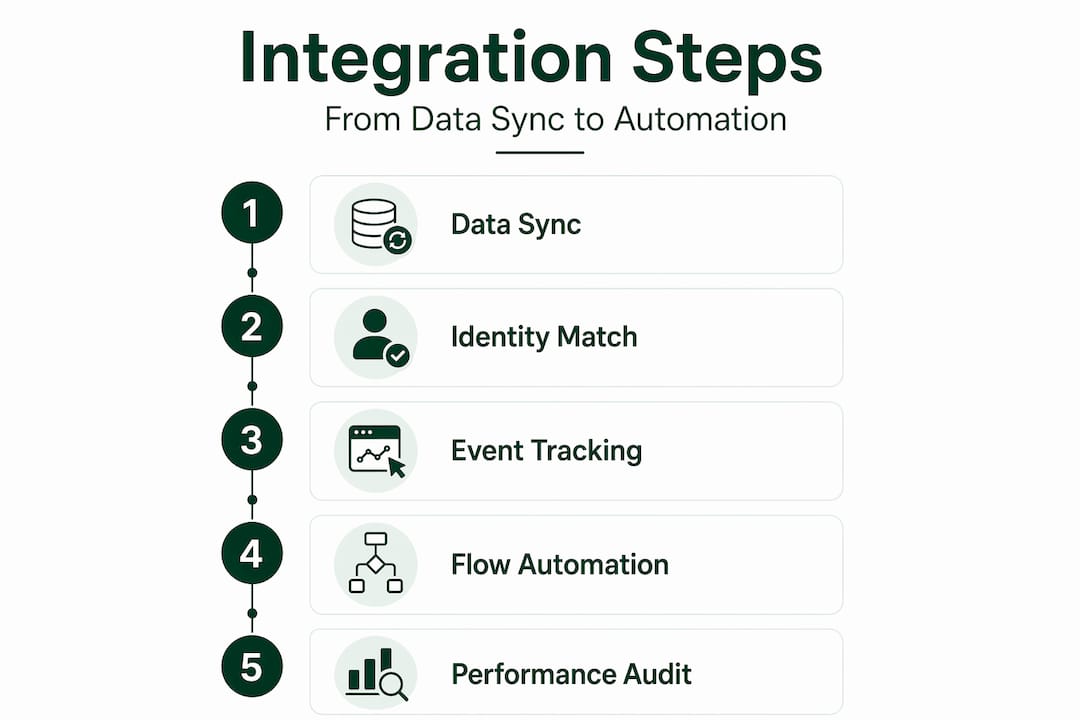
The downstream effects of poor syncing are worse than most teams realize. Customers receive abandoned cart emails for products they already purchased. Winback flows fire for subscribers who bought last week. Segmentation logic breaks because purchase data is 48 hours stale. These are not minor annoyances. They erode trust and suppress conversions.
What separates a functional integration from a strategic one comes down to consistent identity resolution. Your CRM, email platform, and e-commerce store need to agree on who a customer is across every record. Identity resolution and event schema alignment across systems are what prevent erratic triggers and duplicate sends in lifecycle campaigns. This is the technical detail most integration guides skip, and it is exactly where campaigns fall apart.
Pro Tip: Before you configure any automated flow, audit whether your CRM and e-commerce platform use the same unique identifier (email address or customer ID) for every contact. Mismatched IDs are the single most common cause of broken automations.
The practical difference between “connected” and “integrated” tools is this: connected tools share data eventually. Integrated tools share data in a way that makes your emails feel like they were written by someone who knows your customer personally.
Key systems to integrate with your email platform
Not every integration delivers equal value. These are the ones that move the needle for e-commerce brands.
-
CRM email integration. Your CRM holds lifecycle data: purchase frequency, average order value, loyalty status, support history. When your email platform syncs this in real time, you can build segments based on actual customer behavior instead of last month’s export. CRM email integration is what separates “blast” email marketing from lifecycle-driven retention.
-
E-commerce platform sync. Connecting your Shopify, WooCommerce, Magento, or BigCommerce store is non-negotiable. Purchase events, product views, cart additions, and refund activity all become triggers. Platforms like Mailchimp, for example, link with major e-commerce platforms and pull in Google Analytics click data to give you reporting that goes beyond opens and clicks.
-
Customer support tools. When a customer submits a ticket or receives a refund, your email logic should account for that. Sending a promotional email the day after a frustrating support experience is a retention problem. Suppressing or adjusting messaging during open tickets shows customers you are paying attention.
-
Ad channel integration. Syncing email list segments to Meta or Google ad audiences lets you suppress email subscribers from paid acquisition campaigns, suppress recent buyers from prospecting ads, and create lookalike audiences from your highest-value email segments. This is where email campaign integration pays dividends far beyond the inbox.
Here is a quick comparison of integration depth across common e-commerce scenarios:
| Integration type | Basic setup | Fully integrated |
|---|---|---|
| CRM email integration | Manual CSV export/import | Real-time two-way sync with lifecycle data |
| E-commerce platform | Order confirmation triggers only | Full event feed: browse, cart, purchase, refund |
| Ad channels | No connection | Suppression lists and lookalike audiences synced |
| Compliance management | Manual footer checks | Automated compliance fields across all templates |
Compliance integration deserves its own callout. CAN-SPAM requires a physical address and one-click opt-out in every commercial email. Triggered emails frequently miss these required elements because automated templates get set up once and rarely audited. Your integration setup should enforce compliant footers and identity headers across every flow, not just your broadcast campaigns.
Automation and AI in integrated email marketing
Once your data feeds are clean and your systems are connected, automation does the heavy lifting. The math here is compelling. Eight automated e-commerce flows drive approximately 80% of total email revenue, with welcome, abandoned cart, and post-purchase sequences accounting for 70% of that. You can set these up in a single weekend using platform-native templates adapted to your brand.
Here is the order to build them:
- Welcome series. Triggered by new subscriber or first account creation. Sets brand expectations, introduces your value proposition, and often includes a first-purchase incentive.
- Abandoned cart flow. Triggered when a cart is created but no purchase follows within one to four hours. Typically a three-email sequence spread over 24 to 72 hours.
- Post-purchase flow. Triggered immediately after a completed order. Covers order confirmation, shipping updates, product education, and cross-sell recommendations.
- Browse abandonment. Triggered when a logged-in or cookied visitor views a product page without adding to cart. Lower intent than cart abandonment but still recoverable.
- Winback flow. Triggered when a previously active customer goes 60 to 90 days without a purchase. Last chance to re-engage before suppression.
AI takes these flows further, but only if your data foundation is solid. Teams with fully integrated AI are 75% more likely to achieve high email ROI. The catch: only 12% of teams have achieved full integration. The top barriers are integration with existing systems (34%) and poor data quality (25%). AI does not fix bad data. It amplifies it.
Pro Tip: Treat your AI rollout as a data quality project first. Audit your event schema, remove duplicate contacts, and standardize product taxonomy before activating AI-driven send-time optimization or predictive segmentation.

Platforms with native CRM connections simplify this significantly. When your email platform and CRM share a single data layer, you eliminate manual syncing, reduce workflow errors, and get attribution reporting that actually ties email sends to revenue. Explore automated email campaign strategies to see how behavior-triggered flows connect to real business outcomes.
Deliverability and compliance in integrated systems
The best-integrated system in the world means nothing if your emails land in spam. Deliverability is not a one-time configuration. It is an ongoing operational discipline built into your integration setup.
-
Domain authentication. Set up SPF, DKIM, and DMARC records for every sending domain. Warm up new domains over 14 to 28 days, starting with low send volumes to engaged segments before expanding to your full list.
-
Subscriber suppression. Suppress inactive subscribers after 180 days of no engagement. This is a non-negotiable deliverability practice that most teams delay too long. A smaller, engaged list outperforms a large, stale one every time.
-
Compliance headers in automated flows. Every triggered email, including transactional messages, needs to meet CAN-SPAM and GDPR standards. Build compliance fields into your master templates so they cannot be removed during campaign creation.
-
Mixed-region list management. If you sell globally, your email list integration must account for different regulatory requirements by region. GDPR consent requirements differ from CAN-SPAM, and your suppression logic needs to reflect that at the subscriber level.
Deliverability problems almost always stem from neglecting list hygiene and domain warm-up rather than from choosing the wrong platform. The platform matters less than the operational habits your integration enforces.
Practical steps to integrate your email marketing
Getting from “partially connected” to “fully integrated” does not require a six-month technical project. Here is a realistic path:
-
Map your tech stack. List every system that holds customer data: your e-commerce platform, CRM, helpdesk, ad accounts, loyalty program. Identify which ones have native connectors to your email platform and which require an email marketing API or middleware like Zapier.
-
Choose platforms with native integrations. When evaluating email marketing platforms, prioritize those with real-time sync capabilities for your specific e-commerce platform and CRM. Native integrations are more reliable and require less maintenance than custom API builds.
-
Build the five core flows first. Welcome, abandoned cart, post-purchase, browse abandonment, and winback. These generate the majority of email revenue and give you immediate performance data. You can learn about e-commerce automation tips to accelerate this phase.
-
Establish monitoring and iteration cycles. Integration is not set-and-forget. Review trigger accuracy, email performance, and list health monthly. Watch for broken triggers caused by schema changes in your e-commerce platform after updates.
My take on what integration really demands
I have worked with enough e-commerce brands to say this plainly: most teams underestimate integration complexity until they are mid-way through a platform migration with broken automations and a 15% open rate wondering what went wrong.
The conversations I find most valuable are not about which platform to choose. They are about data quality and team readiness. I have seen brands spend significant resources on premium email marketing platforms only to feed them inconsistent, duplicate-ridden customer data. The platform performs exactly as well as the data it receives. That is always the limiting factor.
What I have also learned is that compliance is where integration gets treated as an afterthought. You build the flows, they perform well, and then a triggered email goes out missing a physical address or an unsubscribe link because someone edited the template without checking compliance fields. That is the kind of mistake that comes with real legal and reputational cost.
My honest assessment: email ROI optimization requires treating integration as an evolving foundation, not a completed project. Your data model changes every time you add a product line, a loyalty program, or a new sales channel. Your integration needs to keep pace with your business, not just your last tech review.
The brands that pull ahead are not necessarily those with the most sophisticated tech stacks. They are the ones with clean data, disciplined list hygiene, and automated flows that actually reflect where a customer is in their lifecycle right now.
— Melanie
How The Email Marketers builds integration that drives retention
If your email program is running on disconnected tools, outdated segments, or flows that have not been audited in months, you are leaving repeatable revenue on the table. Theemailmarketers works with e-commerce brands specifically to fix that. From platform selection and email marketing API setup to building automated flows that fire on accurate, real-time customer data, the team handles the technical and strategic complexity so you do not have to. Whether you are building your integration from scratch or untangling a setup that has grown beyond your team’s capacity, see what results look like for brands that have made this shift. You can also explore the retention marketing toolkit for practical frameworks used across high-performing DTC programs.
FAQ
What is email marketing integration?
Email marketing integration is the process of connecting your email platform to other systems like your CRM, e-commerce store, and ad channels so customer data flows in real time and triggers personalized, automated campaigns.
How do I integrate email marketing with my e-commerce store?
Most major email marketing platforms offer native connectors for Shopify, WooCommerce, Magento, and BigCommerce. Start by installing the native integration, mapping your customer and order event data, then building trigger-based flows from that data.
Why does CRM email integration matter for e-commerce?
CRM email integration gives your email platform access to full customer lifecycle data including purchase history, loyalty status, and support interactions. This makes segmentation and trigger logic far more accurate than relying on email-platform data alone.
What is the role of an email marketing API?
An email marketing API allows custom data connections between your email platform and systems that do not have native integrations. It is used when you need to pass specific event data, product catalog information, or customer attributes that standard connectors do not support.
How does email list integration affect deliverability?
Accurate email list integration keeps your audience data current, which means you can suppress inactive or unengaged subscribers before they drag down your sender reputation. Clean, well-maintained lists consistently achieve better inbox placement than large, unmanaged ones.


