.png)


Streamline customer journey mapping for retention

TL;DR:
- High churn usually results from poor visibility of customer drop-off points rather than product issues.
- Building dynamic, real-time customer journey maps requires integrated tools, comprehensive data, and clear ownership.
- Continuous iteration and quarterly updates are essential for maintaining effective, customer-centric retention strategies.
High churn is rarely a product problem. More often, it’s a visibility problem: your team doesn’t know exactly where customers drop off, disengage, or silently switch to a competitor. For 8-figure DTC brands, outdated journey maps blindside even the most experienced teams, creating costly gaps between what you think customers experience and what actually happens. This guide walks you through a practical, step-by-step workflow to build and maintain dynamic customer journey maps that actively power retention and lift customer lifetime value (CLTV). No static diagrams. No hypotheticals. Just a living system that grows with your brand.
Table of Contents
- Assess prerequisites and requirements
- Step-by-step: Build your customer journey map
- Orchestrate and optimize your workflow for real-time results
- Monitor, troubleshoot, and iterate the journey mapping workflow
- Real lessons from mapping at scale
- Unlock advanced retention with our solutions
- Frequently asked questions
Key Takeaways
| Point | Details |
|---|---|
| Map actual vs ideal journey | Comparing actual and ideal customer journeys highlights gaps and opportunities for improvement. |
| Update maps quarterly | Regular map reviews ensure your workflow adapts to changing behaviors and drives retention. |
| Use AI for orchestration | AI-driven triggers and real-time updates boost the effectiveness of journey mapping workflows. |
| Track anonymous-to-known transitions | Capturing transitions from unknown to identified users improves personalization and lifetime value. |
Assess prerequisites and requirements
Before you draw a single node on a map, you need the right raw materials. Skipping this step is why most journey maps become decorative slides that nobody updates. Think of prerequisites as your foundation: without them, even the best map collapses under the weight of real customer data.
Start with your toolset. You need three categories of software working together: a journey mapping platform (such as Smaply, UXPressia, or Lucidchart), an analytics stack (Google Analytics 4, Mixpanel, or Heap), and a CRM with behavioral segmentation (Klaviyo, HubSpot, or Salesforce). These tools must talk to each other, either natively or via a connector like Segment.
Next, gather your data. The four essential data types are:
- Behavioral data: Click paths, session recordings, scroll depth, and exit pages
- Demographic data: Age, location, device preference, and channel affinity
- Purchase data: Order frequency, average order value, category preferences, and return rates
- Browsing data: Product views, search queries, wishlist additions, and time on page
Once you have data, map both actual vs. ideal behavior for every stage of the journey. Actual behavior is what customers really do. Ideal behavior is the pathway you’ve designed for maximum conversion and retention. The gap between the two is your opportunity.
| Data type | Source | Purpose |
|---|---|---|
| Behavioral | Analytics platform | Identify friction and drop-off |
| Demographic | CRM | Segment and personalize |
| Purchase | E-commerce platform | Measure CLTV and frequency |
| Browsing | Tag manager or CDP | Map intent signals |
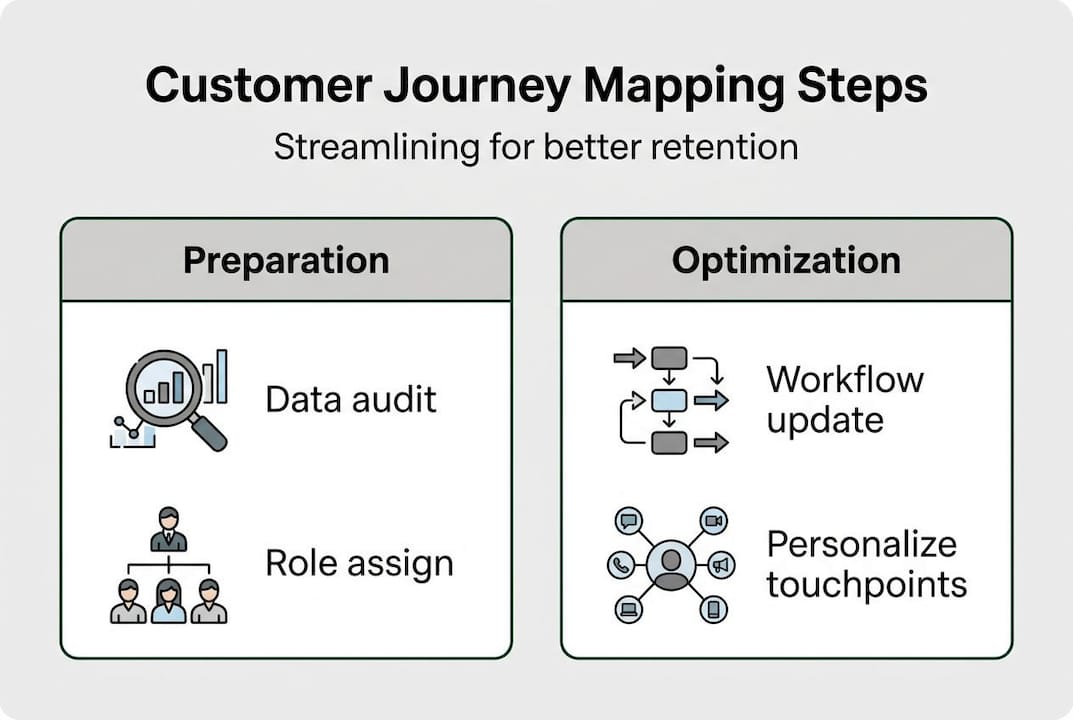
Assign clear team roles before anyone opens a mapping tool. You need a journey owner (usually a retention or CRM manager), a data analyst, a content or creative lead, and a technology owner who manages integrations. Without ownership, maps go stale fast. Understanding customer journey basics is critical before your team starts tagging touchpoints.
For omnichannel touchpoint mapping to work, every signal must be cataloged, even the ones from anonymous visitors.
Pro Tip: List every touchpoint your brand owns across email, SMS, paid social, organic search, on-site pop-ups, and post-purchase flows. Then add the touchpoints you don’t control directly, like review platforms and social mentions. You can’t map what you haven’t acknowledged.
Step-by-step: Build your customer journey map
With prerequisites in place, here’s how to systematically create your customer journey map. This is not a one-afternoon project. For an 8-figure brand, a rigorous build takes one to two weeks of collaborative effort.
- List all touchpoints, starting with anonymous visitors. Before a customer identifies themselves, they interact with ads, organic content, and your website. Document every pre-identification touchpoint first.
- Sequence customer actions from awareness to re-engagement. Map the full arc: ad click, site visit, email signup, first purchase, post-purchase email, repeat purchase, loyalty program, and win-back flow.
- Document actual behavior beside ideal behavior. For each stage, record what customers really do versus what you want them to do. This side-by-side view surfaces the friction points killing your retention.
- Tag emotional states at each stage. What is the customer feeling at checkout? At unboxing? At the 60-day mark when they haven’t reordered? Emotion data drives better message timing and tone.
- Layer in your email flows for customer engagement at each relevant stage. Every automated flow should map to a specific journey moment, not just a calendar date.
- Use AI-driven orchestration tools to automate map updates. When a customer’s behavior changes, the map should reflect it within 24 hours, not at the next quarterly all-hands.
Here’s how static maps compare to dynamic, AI-updated maps:
| Feature | Static map | Dynamic map |
|---|---|---|
| Update frequency | Quarterly or less | Real-time or daily |
| Data integration | Manual imports | Automated via CDP or API |
| Personalization depth | Segment-level | Individual-level |
| Retention impact | Moderate | High |
As leading brands have learned, avoiding static maps and committing to quarterly updates is the minimum standard, not a best practice.

Pro Tip: Schedule a recurring quarterly audit on your team calendar now, before the map is even finished. Pre-scheduling forces accountability and prevents the drift that kills most mapping programs.
Orchestrate and optimize your workflow for real-time results
Once your map is built, it’s time to power it with real-time orchestration for measurable results. A map without orchestration is just a pretty diagram. Orchestration is what turns your map into a revenue engine.
Here’s how to set up a fully orchestrated journey workflow:
- Stage-level triggers: Each journey stage needs an automated trigger. First site visit triggers a welcome series. Cart abandonment triggers an SMS sequence. Post-purchase triggers an onboarding flow. Define these triggers in your CRM or marketing automation platform.
- Omnichannel signal integration: Pull in signals from email opens, SMS clicks, social interactions, and web behavior. Every signal should update a customer’s journey stage in real time.
- Anonymous-to-known transitions: Focus your workflow on the moment a visitor identifies themselves, via email signup, checkout, or social login. This is your highest-leverage attribution window.
- AI-powered personalization: Use machine learning to predict the next best action for each customer. Which customers are at churn risk? Which are ready to upsell? AI surfaces these signals faster than any manual review.
The impact of this approach is concrete. Brands that invest in lifecycle email marketing as part of their orchestration strategy consistently see higher repeat purchase rates and lower churn versus brands using batch-and-blast tactics.
Stat callout: Brands that update journey maps quarterly and automate stage-level triggers see measurable gains in retention rates within two to three quarters of implementation.
Personalization is the multiplier. A personalized email strategy layered onto an orchestrated journey map drives revenue per recipient well above industry averages.
Pro Tip: Build your orchestration workflow around the anonymous-to-known transition first. This single moment determines whether you can attribute revenue to your top-of-funnel spend. Get it right, and your entire attribution model improves.
Monitor, troubleshoot, and iterate the journey mapping workflow
Finally, let’s cover how to keep your mapping workflow sharp and fireproof through ongoing iteration. Building the map is the beginning, not the finish line.
Track these KPIs every month without exception:
- Retention rate: The percentage of customers who make a second, third, and fourth purchase
- CLTV: Customer lifetime value by segment and acquisition channel
- Churn points: The exact stage where most customers disengage
- Conversion flow rate: The percentage of customers moving from one journey stage to the next
Common mapping mistakes and how to fix them:
- Mistake: Only mapping known customers. Fix: Start every map with anonymous visitor behavior.
- Mistake: Treating the map as a one-time deliverable. Fix: Assign a quarterly owner and set a standing review date.
- Mistake: Ignoring post-purchase stages. Fix: Your map should extend through at least three repurchase cycles.
- Mistake: Siloing the map in marketing. Fix: Share iteration learnings with product, customer service, and logistics teams.
- Mistake: Skipping emotional state documentation. Fix: Add a sentiment row to every stage of the map.
For brands investing in re-engagement mapping strategies, iteration data from lapsed customer segments is especially valuable for refining win-back triggers.
“A journey map is only as valuable as its ability to change with your customers.”
Use quarterly reviews to recalibrate based on new purchase data, seasonal shifts, and product launches. Retention campaign optimization compounds when each iteration sharpens your triggers, your segments, and your messaging. Even email design for retention should be audited against journey stage data to make sure the format matches where the customer is emotionally.
As continuous improvement frameworks confirm, the brands that treat journey mapping as an ongoing process outperform those chasing a single perfect map.
Pro Tip: After each quarterly review, hold a 30-minute cross-functional debrief. The insights marketing discovers often solve problems that product and operations didn’t know they had.
Real lessons from mapping at scale
Here’s what most guides get wrong: they treat journey mapping as a design exercise rather than an operational system. The uncomfortable truth is that the brands winning on retention are not the ones with the most elegant maps. They’re the ones willing to sit with messy, incomplete data and iterate anyway.
We’ve seen 8-figure brands spend months crafting visually stunning journey maps that became irrelevant within a quarter because nobody owned the update cycle. The map looked great in a board deck. It did nothing for churn.
The real leverage is in the anonymous-to-known transition, a moment most teams underinvest in because it happens before the customer is “officially” in the CRM. Fixing this one gap has driven material retention improvements for brands we’ve worked with, well before any creative or messaging changes.
Understanding customer-centric mapping benefits reframes the entire exercise: the map exists to serve the customer’s actual experience, not your internal org chart. Quarterly updates are not optional maintenance. They’re the mechanism that keeps your retention strategy aligned with how your market is actually shifting.
Unlock advanced retention with our solutions
If you’re ready to turn your journey map into a retention engine, specialized resources accelerate the process significantly. The Retention Lab gives your team hands-on workflow tools built specifically for DTC brands at scale. You can also explore our customer journey case studies to see how brands like yours have mapped, orchestrated, and optimized their way to higher CLTV. For a more tactical starting point, our retention toolkit includes frameworks and templates that remove the guesswork from every stage of the mapping process. The Email Marketers team can also run a full journey audit and keep your maps current as your brand scales.
Frequently asked questions
What’s the difference between actual and ideal customer journey behavior?
Actual behavior tracks real customer actions, while ideal behavior defines the desired pathway. Mapping both reveals the gaps where retention breaks down.
How often should customer journey maps be updated?
Update maps quarterly to reflect current customer behaviors and keep your retention triggers aligned with real patterns.
Which tools are best for orchestrating customer journey mapping?
Combine a dedicated mapping platform, a CDP or analytics stack, your CRM, and an AI orchestration engine for real-time updates across all journey stages.
What is the benefit of mapping anonymous-to-known customer transitions?
Tracking these transitions reveals your highest-leverage attribution window and enables personalization from the very first identified interaction, boosting retention before competitors even know the customer exists.


